Built for working photographers

Let clients pick the spot in one tap.

Send one link. They pick a location. You get the email — they get one with directions to the spot. No more 20-message chains.

The time-saver

Booking a session? Send one link.

Let your client choose the location — they get a confirmation email with directions to it. You focus on the shoot.

01🗺️
Build or tap spots from the Explore Map

Add your own secret spots or populate your portfolio in 60 seconds from our curated map of local photo locations.

02🔗
Drop one link in HoneyBook, Dubsado, or text

Send your full portfolio or a custom guide for the session. Star your ★ Recommended spots and let clients pick in one tap — no login or app required.

03🔔
Instant pick alert for you + directions for them

You get an instant email and push notification. Your client automatically gets a branded confirmation email with exact parking notes and a one-click map pin.

Works anywhere you can paste a URL.
See it in action

The whole flow, both sides

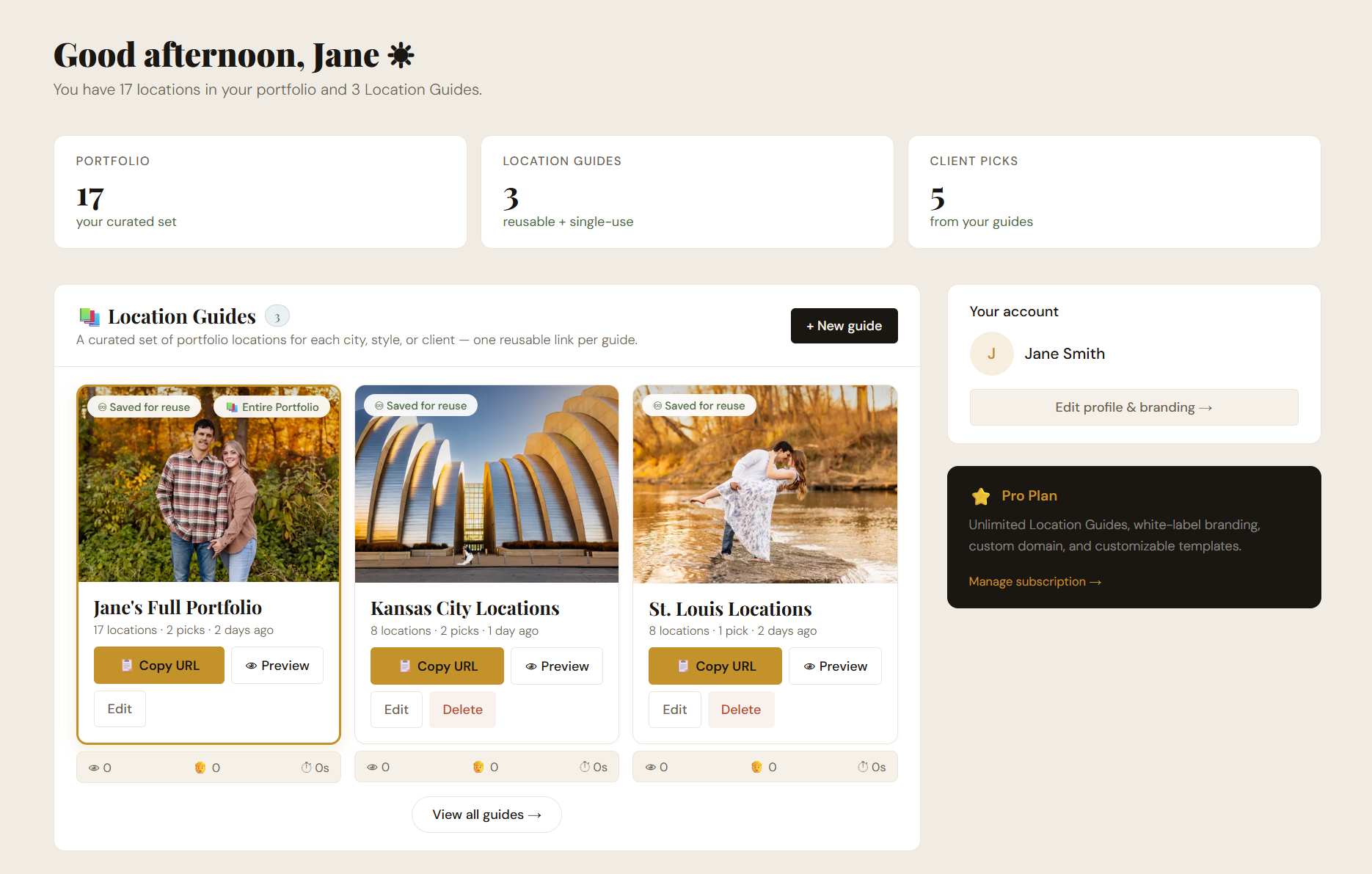
You manage your portfolio + Location Guides from the dashboard. Drop one link to your client and they get the polished pick experience on their phone.

LocateShoot photographer dashboard with portfolio, Location Guides, and client picks
Photographer dashboard
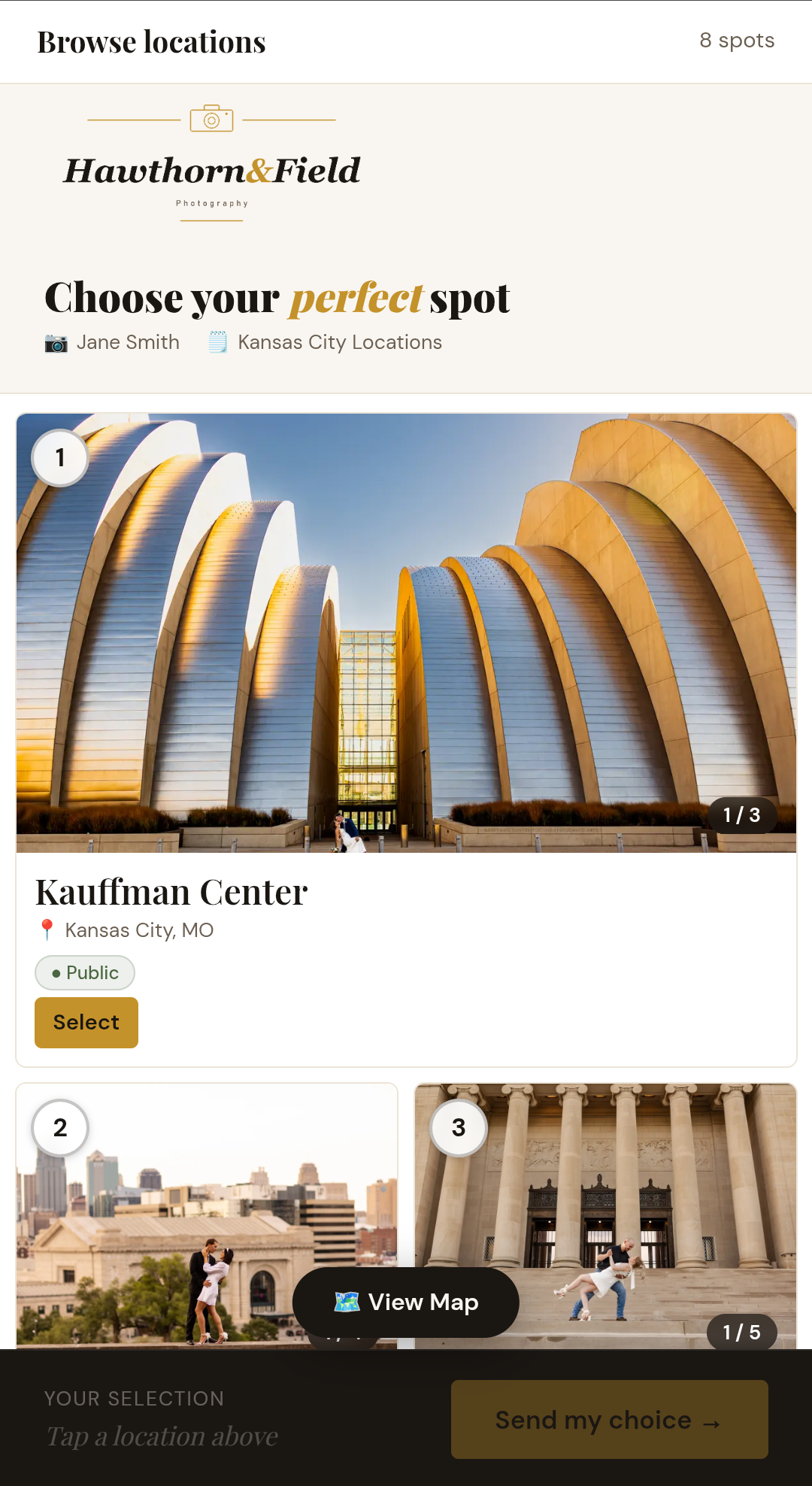
A client viewing a Location Guide on their phone
What your client sees
What's inside a Location Guide

More than a list — everything they need to pick.

🔗
One branded link, sent anywhere you already work

Drop it into HoneyBook, Dubsado, Calendly, or a text — anywhere a URL fits. Your client opens it and sees your curated locations under your logo, colors, and font. On Pro, links live on your own domain, and its homepage can showcase your guides, send visitors to your website, or open a favorite guide.

📸
A real preview of every spot — not just a name

Each location shows your own photos, sits on an interactive map, and includes permit requirements, parking info, and the best time to shoot. Your client can confidently pick before the session.

✉️
You get the email instantly. They get directions.

The pick lands in your dashboard the moment they tap it. Email + push to you, automatic confirmation email with map directions to the client — on Pro, written in your own words with your own tagline, with separate one-pick and multi-pick messages and a different template for each guide if you like. No more digging through inbox threads.

🎯
Multi-stop sessions? Set the rules.

Let clients pick multiple locations for sessions that move between spots, and cap the maximum distance between picks so an engagement shoot doesn't accidentally turn into a road trip.

★
Point undecided clients to your ★ Recommended spots

Star up to 3 favorites in any guide and they stand out with a Recommended badge on the list and the map. Drag them to the top of the guide so they’re the first thing clients see.

⏳
Smart link expiration

Keep a link permanent for your HoneyBook and Dubsado templates, have it expire on a date, or make it single-use so it closes after one pick.

Built around your brand

Looks like your studio, works like a workflow tool

Warm cream, crisp white cards and antique gold. Reads like a wedding magazine feature.
Templates

Six designer templates. Make any of them yours.

From Classic Editorial to Moody Studio, each template is a complete look: layout, cover photo style, colors, fonts and buttons. Start from one, then change anything in the Design Studio with a live preview of your own guide.

Set a default and assign a different template per Location Guide — wedding clients see one look; engagement clients see another.

The difference

Why photographers switch from PDFs & text threads

Explore Map

Don't want to start from scratch? Tap the Explore Map.

Browse a curated map of local photo locations, each with photos, style tags, ratings and permit info. Tap + Add to my portfolio and it's in your portfolio, with the address, map pin and location details already filled in.

Load your go-to parks in seconds, or scout a new city before a destination session, without typing a single address.

Client confirmation email

End the “Where do we park?” texts on shoot day.

The second your client picks, they get a confirmation email under your studio name, with the exact pin, your parking notes and photos, your custom instructions and a one-click directions button.

You get an email and a push notification, and the pick lands in your dashboard log, so you never dig through a thread to remember who chose what.

Simple, honest pricing

Free to start.
Pro when you're ready.

One plan with everything. Start free with 3 locations, and upgrade when you outgrow it.

Free
$0
No credit card required
  • Up to 3 portfolio locations
  • Auto-generated Portfolio Location Guide
  • Email when a client picks (sent to you)
  • ✉️ Client confirmation email with directions
  • Full access to the location map
Pro · Monthly
$15/mo
Billed monthly · cancel anytime
  • Unlimited portfolio locations
  • Unlimited custom Location Guides
  • 📤 Share any single location as its own page
  • 📋 Permit info, 📌 Pinterest, blog & session links
  • 🌐 Custom domain with your own homepage
  • 🎨 White-label pages with your own logo
  • 🖌 Location Guide templates: layout, font & colors
  • ✉️ Custom client email templates, chosen per guide

Card required. No charge until day 15.

Frequently asked questions

Questions photographers ask us

Never. Your client just taps your link on their phone or computer, browses your spots on the interactive map or photo list, and taps their favorite. There are zero logins, passwords, or app downloads.

Yes — a Location Guide is just a clean URL. You can paste your permanent Portfolio Guide link or a reusable city guide straight into your HoneyBook smart files, Dubsado workflows, Calendly confirmations, email templates, or text messages.

Two things happen automatically: you get an instant notification (email + mobile push alert) logging their pick on your dashboard, and your client gets a branded confirmation email with the location details, your parking notes/photos, and a one-click Google/Apple Maps pin.

Yes. With Pro, you can remove all LocateShoot branding, upload your studio logo, customize any of our 6 designer templates in the visual Design Studio, and connect your own custom subdomain (like locations.yourstudio.com) with a branded showcase homepage.

The Free plan is free forever and includes up to 3 portfolio locations, an auto-generated Portfolio Guide link, client confirmation emails, and full access to the Explore Map. Pro starts with a 14-day free trial and you can switch between monthly and yearly or cancel in one click from your billing settings.

Ready to skip the “Where should we shoot?” texts?

Start free with 3 locations, or try every Pro feature free for 14 days.